Track the promises you make in email
A commitment tracker picks out the promises you make in email, like “I'll send the deck by Friday”, and turns them into dated reminders. InboxDraftWriter does this for every email you send.
The problem
You promise things all day in email and keep the list in your head. A week later a client asks where the document is, and you only then remember you said Thursday.
How to do it with InboxDraftWriter
- Sign up free. No card needed.
- Load the sample inbox. The demo mailbox includes sent emails with promises in them. Connecting your own mail is coming soon.
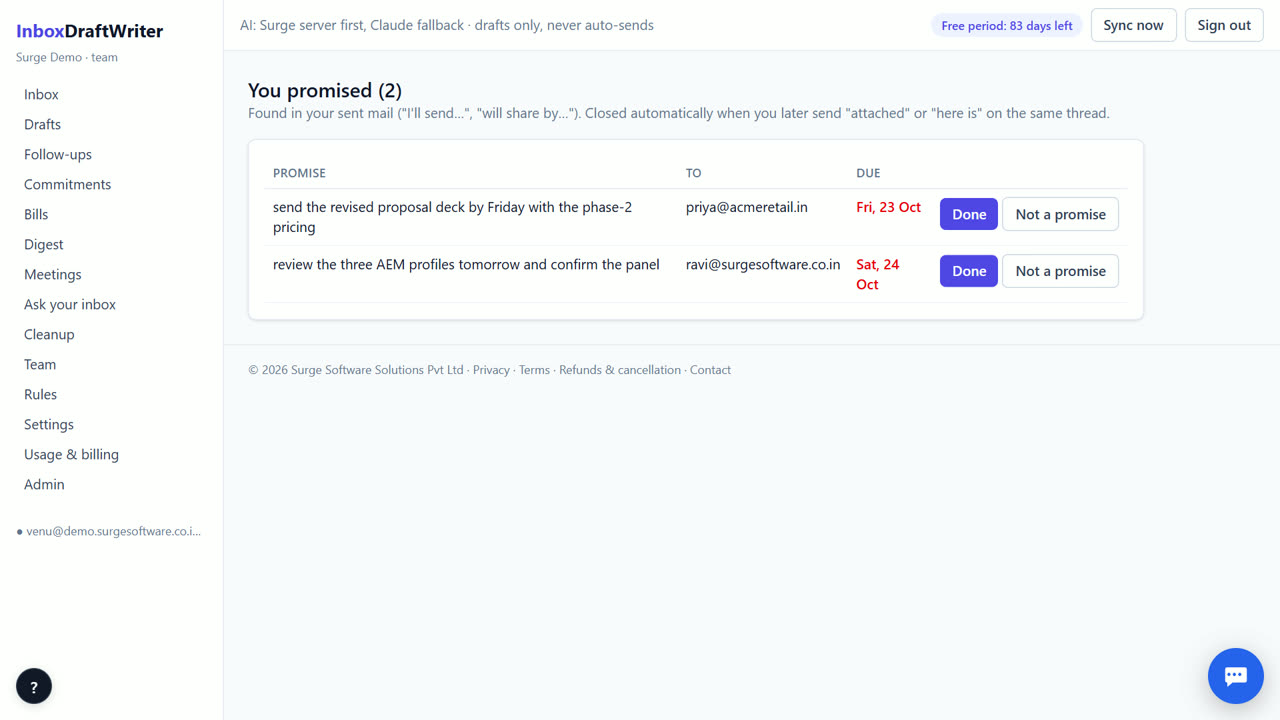
- Open Commitments. Each promise shows who it was made to, what you said and the date you gave.
- Mark done. Tick it done when you deliver. When you later send what you promised in the same thread (“attached”, “here is”), it is closed for you.
- See it in the digest. Promises due today show up in the morning digest.
What you get
- Promises pulled from your sent mail
- Who, what and by when
- Closed by itself when you deliver in the thread
- Due items in the digest
- No separate to-do app
What it costs
Free for 15 days, then at cost, no card to start. Fyxer AI costs $49 / seat / mo ($37 annual). See pricing.
When InboxDraftWriter is not the right tool
If your team runs on a project tool like Asana or Jira, keep tasks there; InboxDraftWriter tracks only what was promised in email and doesn't sync to task tools.
Questions
Does it read other people's promises too?
It tracks what you promised. Emails waiting on others appear as follow-ups instead.
What if there is no date?
It still lists the promise, without a due date.
Can I dismiss one?
Yes, dismiss anything that isn't really a promise.
Try it on the sample inbox in two minutes.
Start freeQuestions? Ask the assistant at the bottom right — it answers 24/7.
Related: Email follow-up reminders with a ready nudge · AI email assistant for founders · InboxDraftWriter vs Fyxer AI · Pricing
Last updated 2026-11-01 · by Venu Gopal Reddy Muvva, founder