Faster email replies for freelancers
Freelancers answer the same kinds of client emails every week. InboxDraftWriter writes those replies in your own voice so you only edit and send, and it reminds you when a client has gone quiet.
The problem
When you are deep in client work, email waits. A proposal goes out and nobody follows up. A client asks a simple question and the reply takes a day because writing it well takes ten minutes. Promises made in email (“I'll send the draft Thursday”) live only in your head.
How to do it with InboxDraftWriter
- Sign up. Name, email, password. Free to start, no card.
- Load the sample inbox. The demo mailbox shows how client questions, meeting requests and invoices are handled. Your own Gmail or Outlook connection is coming soon.
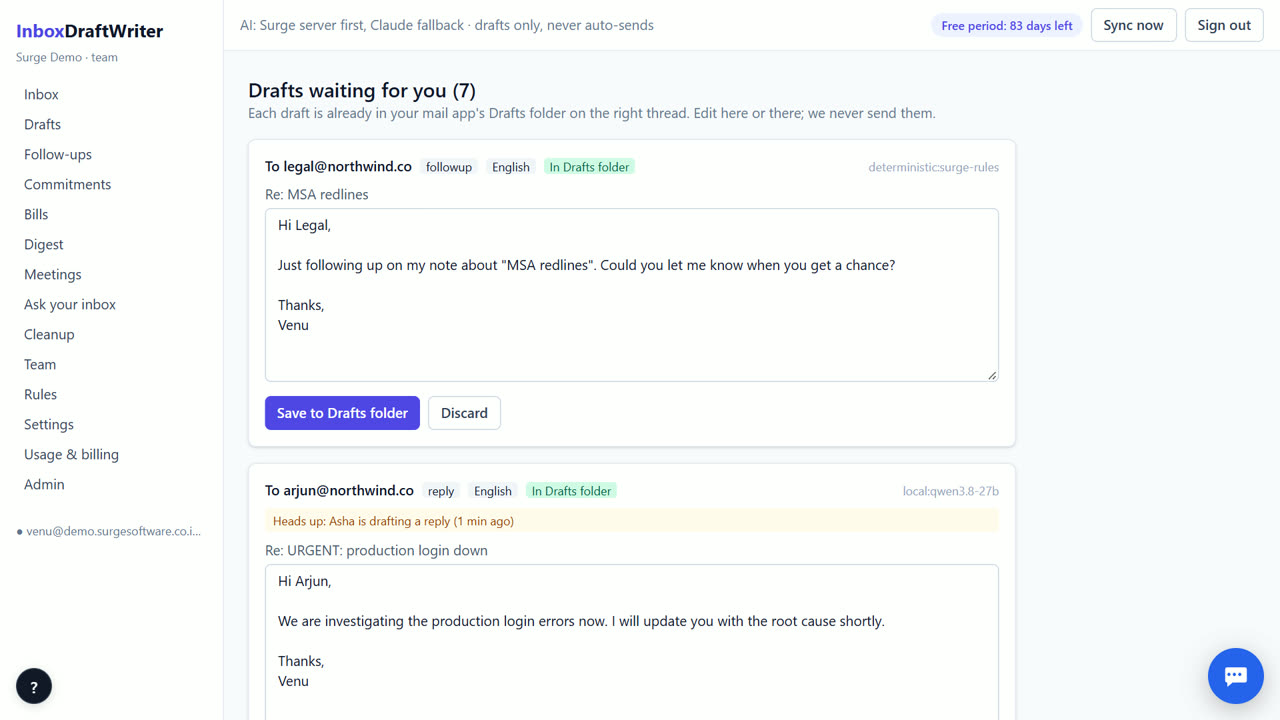
- Edit the drafts. Drafts use your greeting, sign-off and usual length, learned from mail you sent. When the facts are not in the thread, the draft leaves a clear {{ask: …}} gap instead of guessing.
- Let follow-ups come back. If you sent an email and got no reply in 3 days, it appears under Follow-ups with a short nudge draft ready.
- Keep your promises. The Commitments page lists what you promised in email and by when. Mark them done as you go.
What you get
- Reply drafts that sound like you
- Gaps marked instead of made-up facts
- Nudge drafts for silent clients
- A dated list of what you promised
- Meeting-time suggestions from your calendar
What it costs
Free for 15 days, then at cost, no card to start. Superhuman costs ₹3,299 / seat / mo (₹2,700 annual), Business plan. See pricing.
When InboxDraftWriter is not the right tool
If you mainly need invoices, time tracking or proposals, a freelancing tool will serve you better; InboxDraftWriter only reads bills that arrive by email. And it can't connect to your real mailbox yet (coming soon).
Questions
Will clients know an AI wrote it?
The draft is written to sound like you, and you edit and send it yourself, so it goes out as your email.
Does it invent details?
It is told not to. When something isn't in the thread, the draft leaves an {{ask: …}} placeholder for you to fill.
How long is the follow-up wait?
3 days by default. Change it in Settings.
Try it on the sample inbox in two minutes.
Start freeQuestions? Ask the assistant at the bottom right — it answers 24/7.
Related: Email follow-up reminders with a ready nudge · Track the promises you make in email · InboxDraftWriter vs Superhuman · Pricing
Last updated 2026-11-01 · by Venu Gopal Reddy Muvva, founder