Unsubscribe and clean up your inbox
Important emails get missed because they sit under mail you never read. InboxDraftWriter finds senders you never open, lets you unsubscribe in one click and archives their old mail in bulk.
The problem
Newsletters, promotions and notifications pile up faster than you can delete them, and unsubscribing one by one takes forever. The real emails get buried.
How to do it with InboxDraftWriter
- Sign up free. No card needed.
- Load the sample inbox. The demo includes newsletters you never opened. Connecting your own mailbox is coming soon.
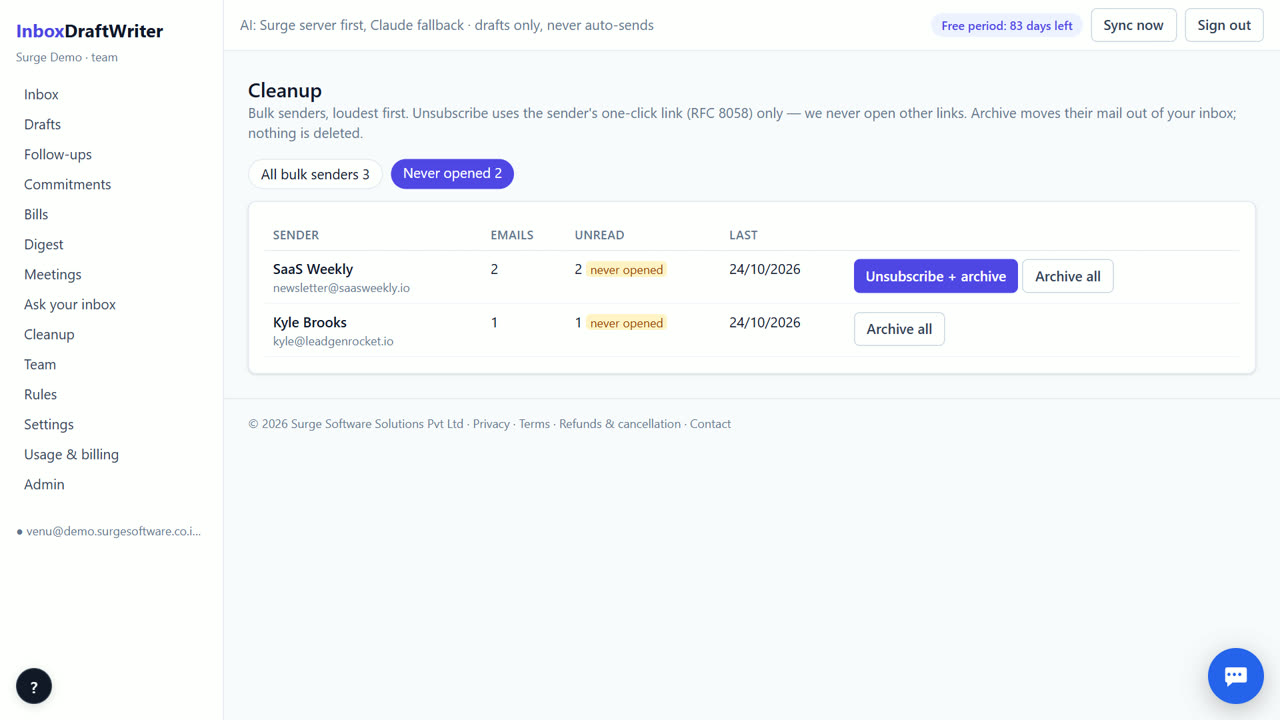
- Open Cleanup. Bulk senders are listed with how many emails they sent and whether you ever opened one.
- Show never-opened. Filter to senders whose mail you never opened. These are the easy ones to let go.
- Unsubscribe and archive. One click unsubscribes (where the sender supports it) and archives their mail. Nothing is deleted.
What you get
- Bulk senders in one list
- A never-opened filter
- One-click unsubscribe
- Bulk archive, nothing deleted
- A quieter inbox for the emails that matter
What it costs
Free for 15 days, then at cost, no card to start. Shortwave costs $30 / seat / mo. See pricing.
When InboxDraftWriter is not the right tool
If you want every old email deleted for storage space, use your mail provider's own tools; InboxDraftWriter archives and never deletes your mail.
Questions
Does it delete emails?
No. It archives them; you can still find them.
Does unsubscribe always work?
It uses the sender's one-click unsubscribe link when the email has one.
Does cleanup cost anything?
No AI is used for cleanup, so it never costs anything.
Try it on the sample inbox in two minutes.
Start freeQuestions? Ask the assistant at the bottom right — it answers 24/7.
Related: Sort email automatically with AI · AI email assistant for founders · InboxDraftWriter vs Shortwave · Pricing
Last updated 2026-11-01 · by Venu Gopal Reddy Muvva, founder