Meeting recap email from a transcript
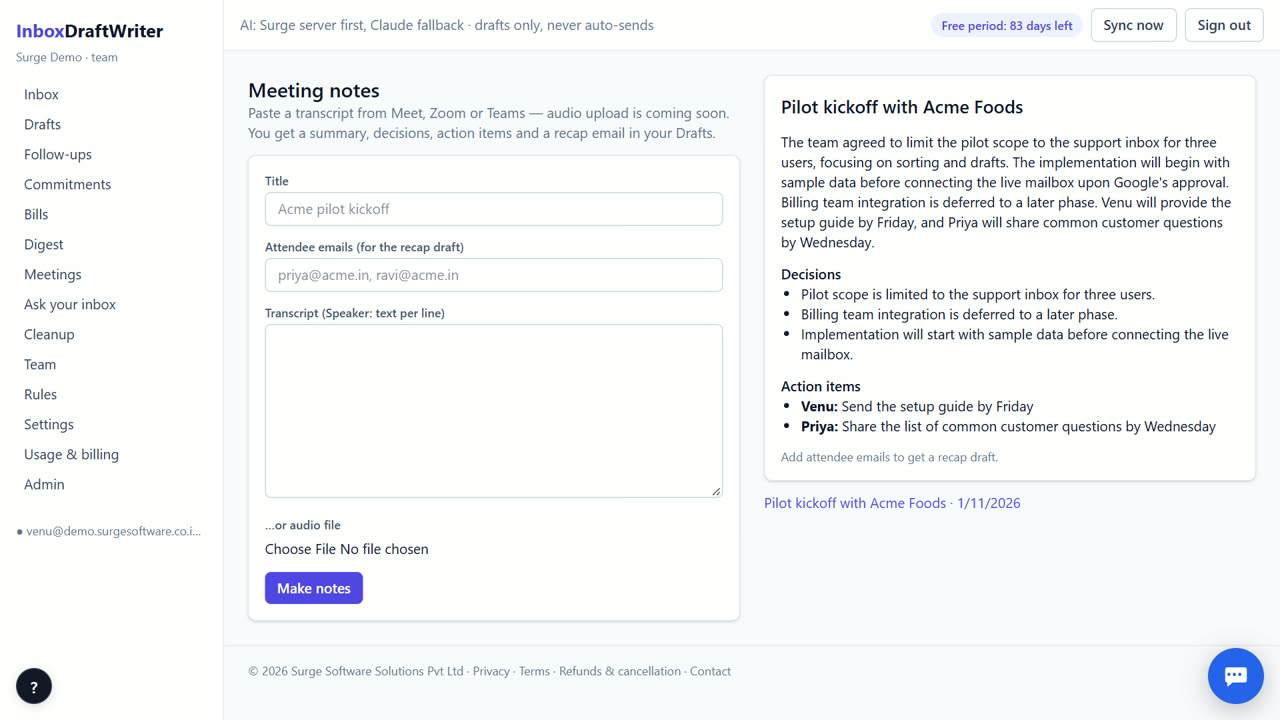
Paste the transcript of a meeting and InboxDraftWriter writes a short summary, the decisions, the action items with owners and a recap email for the attendees, waiting in your Drafts.
The problem
After a call, the recap email is the job nobody wants. By the time you write it, people remember the meeting differently and the action items have no owner.
How to do it with InboxDraftWriter
- Sign up free. No card. Free to start.
- Open Meetings. In the app, open Meetings and give the meeting a title.
- Paste the transcript. Paste the text from your call tool's transcript. Uploading an audio file is coming soon.
- Add attendees. Type the attendees' email addresses so the recap is addressed to them.
- Review the recap. You get a summary, decisions and action items with owners, and a recap email in Drafts. Edit it and send it yourself.
What you get
- A short summary
- Decisions in a list
- Action items with owners
- A recap email draft to attendees
- Nothing sent for you
What it costs
Free for 15 days, then at cost, no card to start. Fyxer AI costs $49 / seat / mo ($37 annual). See pricing.
When InboxDraftWriter is not the right tool
InboxDraftWriter does not join your calls or record them. If you want a bot that sits in your Zoom or Google Meet and takes notes live, Fyxer and other note-takers do that.
Questions
Can I upload a recording?
Not yet. Audio upload is coming soon; paste a transcript today.
Where does the recap go?
Into Drafts, addressed to the attendees you typed. You send it.
Does it work for Hindi meetings?
Paste the transcript in English for now; Indian-language features are switched off.
Try it on the sample inbox in two minutes.
Start freeQuestions? Ask the assistant at the bottom right — it answers 24/7.
Related: Track the promises you make in email · Faster email replies for freelancers · InboxDraftWriter vs Fyxer AI · Pricing
Last updated 2026-11-01 · by Venu Gopal Reddy Muvva, founder